Separate five decisions that often get combined
A family contact, payer, appointment organiser, person authorised to consent and recipient of clinical information are not necessarily the same person. Start a row for each person and each action: receiving an appointment notice, completing an intake form, paying an invoice, viewing a report or requesting a record. Avoid a single unrestricted guardian checkbox. Ask the vendor how a clinic can represent separate scopes without copying one contact’s permissions to everyone linked to the family. Treat the matrix as a proposal for clinic review, not an access grant.
Confirm the applicable rule before configuring it
Canadian privacy obligations vary by province, organisation and activity. The Office of the Privacy Commissioner of Canada explains that federal and provincial laws can interact, and its meaningful-consent guidance addresses understanding and maturity. Do not turn a software age setting into a nationwide rule for parental access, treatment consent or access to health records. Name the clinic’s privacy lead and regulated professional who will resolve uncertainty under the applicable law and professional standards. Store the decision and review trigger without placing sensitive supporting documents into a public product enquiry.
Design permissions around purpose, not convenience
For a fictional family, define who can see appointments, receive reminders, complete forms, view invoices and access reports. Consider whether a payer should see the payment document without receiving clinical notes, and whether a scheduling contact needs any report access at all. Ask what the recipient sees in email previews, portal notifications, downloads and exports, not only inside the main screen. Record the purpose and approving role for each permission. Where the vendor cannot separate the required scope, mark the requirement unavailable and agree on a reviewed alternative rather than quietly widening access.
Run a changed-authority scenario from beginning to end
Use fictional child Sam and contacts A and B. Suppose the clinic has reviewed A for scheduling notices and an invoice copy, while B has a separately reviewed report-access scope. These are invented demonstration permissions, not a suggested default for a real family. Change B’s authorised scope and test a fresh login, an already-open session, an old invitation and a copied protected link. Check that the retained record explains the earlier decision and the change. Revocation cannot recall a file already downloaded, so include the clinic’s response procedure rather than promising that deletion reverses every disclosure.
Include transitions, disputes and staff handoffs
Ask what triggers another review: a request for different recipients, changed authority, the young person’s evolving ability to consent, a new service, a disputed instruction or a staff role change. Put a named owner and next action on unresolved cases. Reception staff should be able to recognise a review-needed state without interpreting court documents or clinical capacity themselves. Separate an emergency or safeguarding process from routine product access, and obtain qualified advice where needed. Ask how the system avoids sending an automatic invitation while the decision is unresolved.
Keep evidence proportionate and test the negative cases
Use made-up names and blank documents in vendor demonstrations. Capture the role, environment, expected result, observed result and limitation for each test, rather than collecting screenshots containing real family information. Try an unapproved recipient, expired invitation, wrong-family link and deactivated staff account. Review whether audit events identify the action and actor without unnecessarily copying report contents into logs. The clinic should decide retention and access to its review evidence. A successful demonstration supports a procurement decision; it does not certify the software, contract or clinic as compliant.
Agree on a rollout acceptance record
Before inviting a real family, list the exact product environment, approved configuration, responsible reviewer, tested scenarios and open limitations. A mock-up, public walkthrough or developed module is not proof that the hosted permission workflow is accepted for your clinic. Flor remains in early access, and its public forms and AI assistant are for business/product questions only. Bring this matrix to a guided demonstration, confirm the supported scope in writing and keep real child records out of that enquiry. Revisit the decision when the people, purpose, service or rules change.
Test a limited grant and its later change
Use fictional contacts with separately reviewed scheduling, payment and report scopes. Preview what each can do, change one permission and test an old link and an already-open session. Record the expected result, observed limitation, reviewer and next action. Do not grant real access or enter family information into the public demo.
| Check in the demonstration | Evidence to record |
|---|---|
| Person and purpose match the reviewed scope | Describe the observed result using fictional data. |
| Invitation, old session and revocation tested | Record the role, exception and any manual work required. |
| Unresolved decisions have an owner | Agree on pass, follow-up or unavailable before rollout. |
Continue with patient portal software for connected care and patient intake forms for therapy practices to test the connected steps. The interactive Flor demo provides fictional examples for the discussion.
Questions for a Canadian clinic
Build the evaluation around your province, disciplines and funding arrangements. Ask for quotes in CAD and inspect the receipt fields your clinic requires. Where guardians or third-party recipients are involved, separate the client record, relationship and access decision. Confirm any payer connection individually.
Privacy obligations depend on the circumstances; federal and provincial rules can interact. The Office of the Privacy Commissioner of Canada explains the provincial context. Use that guidance to frame a service-specific review, without assuming that a Canadian domain establishes data residency.
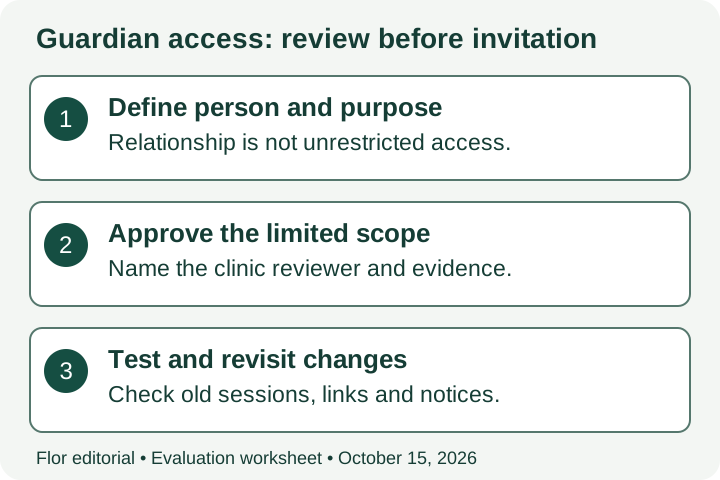
Relationship and permission review matrix
Record the person, requested action, clinic reviewer and evidence before any invitation. These are evaluation categories, not legal defaults or permission grants.
| Review case | Scope to test | Evidence and limit to record |
|---|---|---|
| Scheduling contact | Appointments and administrative notices | Purpose, reviewed authority and approved scope; no automatic report access. |
| Payment recipient | Invoice or receipt copy | Verified recipient and necessary financial fields, separate from clinical notes. |
| Report recipient | Named report or record scope | Clinic-reviewed decision, subject, version and secure recipient identity. |
| Changed or unresolved scope | Review-needed state | Owner, reason, effective time, old-session/link behaviour and follow-up. |
Primary sources checked October 15, 2026: OPC meaningful-consent guidance, joint OPC/Alberta/BC guidance on meaningful consent and provincial privacy-law context. Consent to information handling, treatment consent and record-access authority require separate clinic-specific review.
A few common questions
Does being listed as a parent automatically grant every portal permission?
Do not infer authority or access scope from a contact label. The clinic must review applicable law, professional obligations and the particular decision before configuring permissions.
Does this guide confirm that Flor’s guardian workflow is accepted for clinical rollout?
No. It is an evaluation worksheet. Require evidence for the exact hosted environment and scenario, along with the clinic’s operational and privacy approvals.
Prepared for clinic owners in Canada. Updated . These guides support product evaluation and do not replace professional or legal advice.